
How Company Certification Has Evolved
Ten years of BIM certification experience. Learn how ISO 19650 certification has matured, its business benefits, and when organisations are ready.

Many companies have swapped over to the new Industry Collections from the old Suites that Autodesk offered. These collections give access to much more software that was previously available, however when it comes to installation each product is treated individually, almost like a stand alone product. Although Autodesk allow deployments to be created for each product in the suite, there is no combined installer for all products. These in turn then need to be installed individually onto each client PC often in the right order ... a little bit time consuming I'm sure you agree.

Personally I find that once your over 10 seats this becomes a very tedious process. Each company and department is different and I regularly find there are several challenges that we face when deploying out CAD Software:
These challenges can make what should be a simple installation, complex and time consuming.
Here at Symetri we mitigate these challenges and the limitations in the Autodesk Collections Deployment methodology by using our CQI solution.
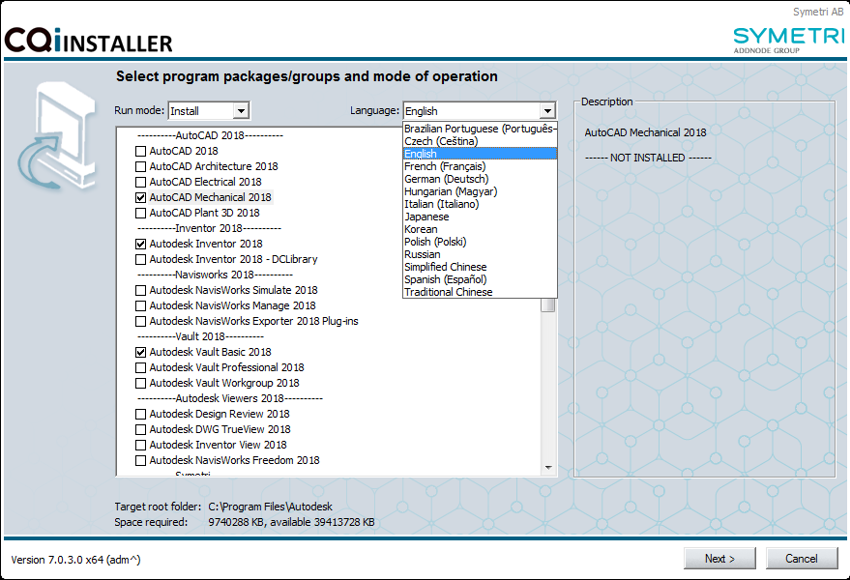
CQI is a solution that takes care of both installation, maintenance and configuration of CAD applications, other 3rd party applications and their customisations.
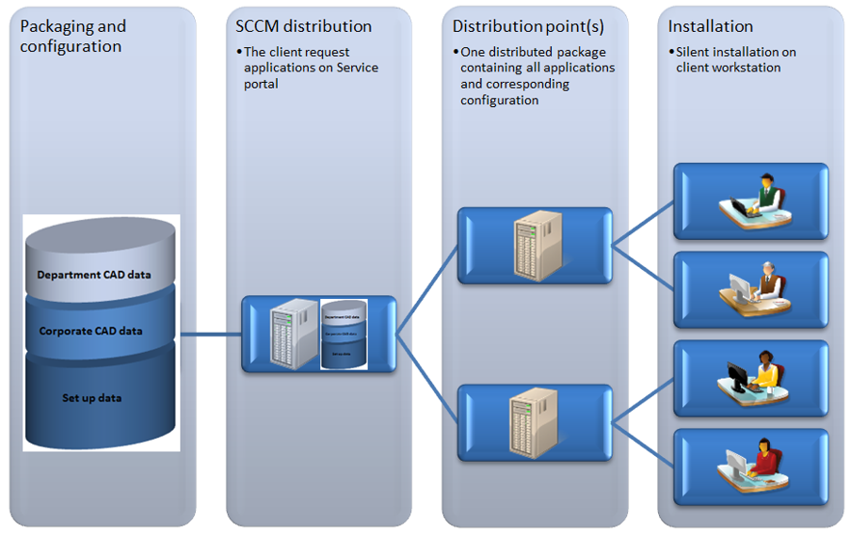
Our dedicated team have spent time packaging the collections ready for installation at client sites, making the installation of these collections as quick and straight forward as possible. CQI currently has more than 3000 users many of which have had this tailored to their environment to include Corporate and Departmental cad data as well as other tools used by the design teams. It can be directly installed or triggered via SCCM allowing it to be scaled from small to larger organisations.
Why not get in touch and find out how CQI could help you deploy out.
Ten years of BIM certification experience. Learn how ISO 19650 certification has matured, its business benefits, and when organisations are ready.

Digital transformation is reshaping the built environment, but successful change requires more than new technology. Discover how Symetri's approach to BIM, digital delivery and organisational change has earned four nominations at the 2026 Building Innovation Awards.
If you're new to Bluebeam Max or simply want to learn more about what it can do, we've gathered answers to the questions we're asked most often.